
Diabetes Connect2.6.5 - Google Play
You'll be able to see results in few seconds.
Publisher Description
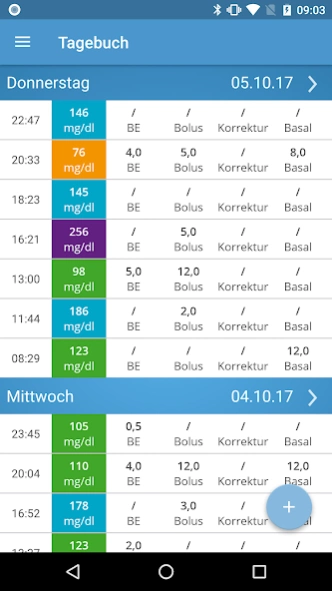
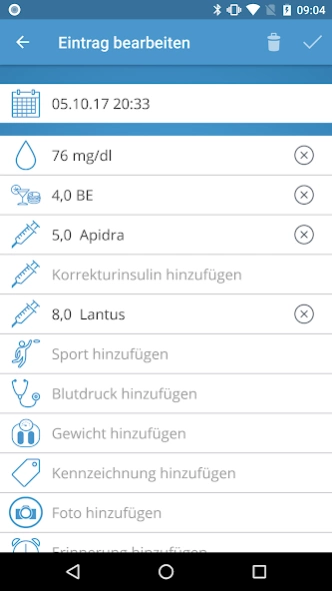

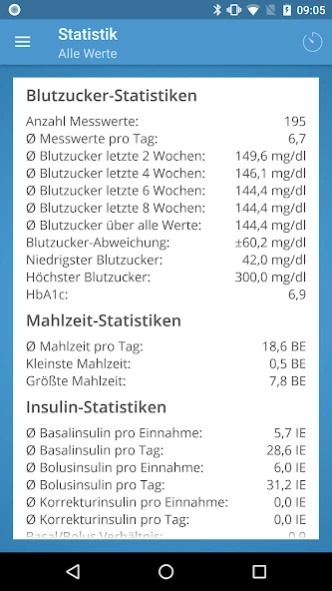
DiabetesConnect - Your Documentation, Easy and Fast
With Diabetes Connect you have your diabetes under control at all times, regardless of where you are. Simply sign in and your documentation is a snap!
By diabetics - for diabetics.
Now you can record all your diabetes-related data fast and easy and create all your documentation with just a few clicks. Blood sugar, meals, insulin injections, medication and many more can be tracked with Diabetes Connect while all your data is always in your pocket. Everything you don't need can be turned off, so everything stays nice and neat.
Your values can be synced over multiple devices, handing you an up to date documentation - wherever you are. You can also access your data over our web portal and create your exports and statistics there.
Nice and clear graphics and statistics help to get a perfect overview of your current diabetes therapy.
For your next doctor's appointment, your values can be exported into a well-formed PDF-file.
Functions:
- Administer all your diabetes-data
- Suitable for Type1- and Type2-Diabetics
- Support for mg/dl and mmol/l
- Track your meals as bread units, carbohydrate units or carbohydrates
- Get important medical staticstics right in the app
- Synchronisation over multiple devices
About Diabetes Connect
The company that develops Diabetes Connect is SquareMed Software GmbH. The latest version released by its developer is 2.6.5.
To install Diabetes Connect on your Android device, just click the green Continue To App button above to start the installation process. The app is listed on our website since 2020-12-20 and was downloaded 0 times. We have already checked if the download link is safe, however for your own protection we recommend that you scan the downloaded app with your antivirus. Your antivirus may detect the Diabetes Connect as malware as malware if the download link to com.squaremed.diabetesconnect.android is broken.
How to install Diabetes Connect on your Android device:
- Click on the Continue To App button on our website. This will redirect you to Google Play.
- Once the Diabetes Connect is shown in the Google Play listing of your Android device, you can start its download and installation. Tap on the Install button located below the search bar and to the right of the app icon.
- A pop-up window with the permissions required by Diabetes Connect will be shown. Click on Accept to continue the process.
- Diabetes Connect will be downloaded onto your device, displaying a progress. Once the download completes, the installation will start and you'll get a notification after the installation is finished.
Program Details
System requirements
Download information
Pricing
Version History
version 2.6.5
posted on 2020-12-20
Bugfixes and minor improvements
version 2.5.0
posted on 2020-10-24
Version 2.5
- Labels can now be sorted and deselected in the settings. This way you can only see the labels you need when you create them.
- Information about the archives added.
- Fixed a bug in the archives that sometimes only archived half a day.
version 2.4.1
posted on 2017-10-10
We have changed a lot in the background and prepared other great features.
This update already contains some minor adjustments and improvements.
version 2.3.1
posted on 2016-10-05
- Improved server communication,- Adaptions for Android 7,- Notifications are now more exact and reliable,- Many small improvements and bugfixes
Disclaimer
Official Google Play Link
We do not host Diabetes Connect on our servers. We did not scan it for viruses, adware, spyware or other type of malware. This app is hosted by Google and passed their terms and conditions to be listed there. We recommend caution when installing it.
The Google Play link for Diabetes Connect is provided to you by apps112.com without any warranties, representations or guarantees of any kind, so access it at your own risk.
If you have questions regarding this particular app contact the publisher directly. For questions about the functionalities of apps112.com contact us.
